In a trial published this month by the Education Endowment Foundation, primary teachers who used an AI lesson planning tool spent about two and a half hours a week planning, compared with three hours and 19 minutes for teachers who did not. That is roughly 49 minutes saved each week, with no drop in lesson quality. Broader surveys report much bigger numbers, and the truth sits somewhere in between. This guide looks at how AI lesson planning really works, where it saves the most time, and how to use it so your lessons still sound like you.
We will cover what lesson planning with AI actually involves, five ways it helps, and how GuruKool AI turns a topic into ideas, explanations, diagrams, examples, and simpler versions in one place. If you have already read our overview of AI tools for teachers, this post goes deeper into the single task where teachers lose the most time: planning the lesson itself.
Why Lesson Planning Eats So Many Evenings
Lesson planning is the part of teaching that nobody sees and almost every teacher feels. A lesson that runs for forty minutes can take far longer to prepare, and one 2026 teacher guide estimates that building a plan from scratch takes anywhere from thirty minutes to two hours. Multiply that by five classes a day and the evenings disappear.
The Blank Page Problem
The hardest part of lesson planning is often the very start. A teacher knows the standard and the topic, but turning those into a sequence of activities, questions, and checks takes real creative effort. Staring at an empty page uses up energy before any real work begins. Teachers describe this as the slowest part of lesson planning, even when they are experienced and confident about the subject.
Planning for Every Level at Once
Modern classrooms rarely have one level of understanding. Some students need a simpler explanation, others need a challenge, and a few need the idea shown in a different way altogether. Preparing those versions by hand multiplies the workload, which is why lesson planning with differentiation is where the hours pile up fastest. Surveys of teachers who use AI consistently find that planning and assessment account for around three quarters of the time they save.
Want to see a first draft appear in minutes instead of an evening? Try GuruKool AI free and plan your next lesson with it.
What Is AI Lesson Planning?
AI lesson planning means using an AI system to draft the building blocks of a lesson, such as ideas, explanations, examples, diagrams, and simpler versions, so the teacher can review, edit, and decide. It is a way to speed up lesson planning, not a way to hand the lesson over to a machine.
A Drafting Partner, Not an Autopilot
The best way to think about AI lesson planning is as a fast drafting partner. It produces a starting point in seconds, and the teacher supplies what only a teacher knows: the students, the school, the pacing, and the moments that tend to go wrong. A draft that ignores those details may look polished and still miss the mark, which is why every AI-generated plan needs a teacher’s eye before it reaches a classroom.
What the Research Actually Shows
Survey numbers can sound dramatic. Gallup and the Walton Family Foundation found that teachers who use AI weekly estimate saving 5.9 hours a week, though those figures are teachers’ own estimates. Controlled trials report smaller but still real gains. An English trial of 259 secondary science teachers found that those using AI for lesson preparation planned for about 56 minutes a week versus 81 minutes without it, and the EEF trial found a 24 percent reduction in lesson planning time. The honest summary is that AI lesson planning saves meaningful time, and the biggest gains go to teachers who are newer to a subject.
The RAND Corporation’s 2025 survey adds useful detail on where the hours come from. Of the roughly seven hours a week that regular AI users report saving, about three come from preparing lessons, with most of the rest coming from grading and communication. The EEF trial also offers a note of caution: fewer than one in five teachers felt the tool meaningfully changed how they taught. That is a healthy reminder that AI speeds up preparation, while the quality of the teaching still depends on the teacher using the saved time well.
5 Ways AI Lesson Planning Helps You Teach Better
Five specific jobs account for most of the value, and each one maps to a step you already do by hand.
- Generate lesson ideas: fresh angles and activities for any topic
- Explain topics: a clear summary you can check before teaching
- Create diagrams: visuals drawn step by step on a whiteboard
- Prepare examples: real-life cases students already understand
- Simplify difficult concepts: easier versions for students who need them
Generating Lesson Ideas and Explaining Topics
Brainstorming is the most common way teachers use AI, and it is also where AI lesson planning feels most natural. Ask for three ways to introduce fractions, and you get options to react to rather than a blank page. An AI tutor can then explain the topic step by step, which helps a teacher confirm they are teaching it accurately, especially when the unit falls outside their usual specialty.
Creating Diagrams and Preparing Examples
A good diagram can replace five minutes of explanation, but drawing one takes time. With an interactive whiteboard, a teacher can build the diagram live or save it in advance, and the digital whiteboard keeps it ready for the next class. Examples work the same way. Instead of searching for a real-life case, a teacher can ask for three that fit the students’ age and interests.
Simplifying Difficult Concepts for Every Level
Simplifying a hard idea without making it wrong is a skill, and it is time-consuming to do for every student. With lesson planning support from AI, a teacher can ask for the same concept at a simpler reading level, or with an analogy, in seconds. Paired with personalized learning, those simpler versions can reach the students who need them without singling anyone out.
Three simple habits keep AI drafts trustworthy. First, check every fact and every example against your own knowledge before it reaches students, because a confident draft can still contain a mistake. Second, rewrite at least the opening and the closing in your own words, since those are the moments students notice most. Third, keep a short list of what worked, so each new draft starts closer to your style. Teachers who build these habits report that the tool gets more useful over time, because they stop fixing the same problems and start refining the good parts.
See all five steps in one workflow. Start a free GuruKool AI session and plan a lesson from a single topic.
AI Lesson Planning vs Traditional Lesson Planning: A Comparison
Here is how the two approaches compare on the parts of lesson planning that take the most time.
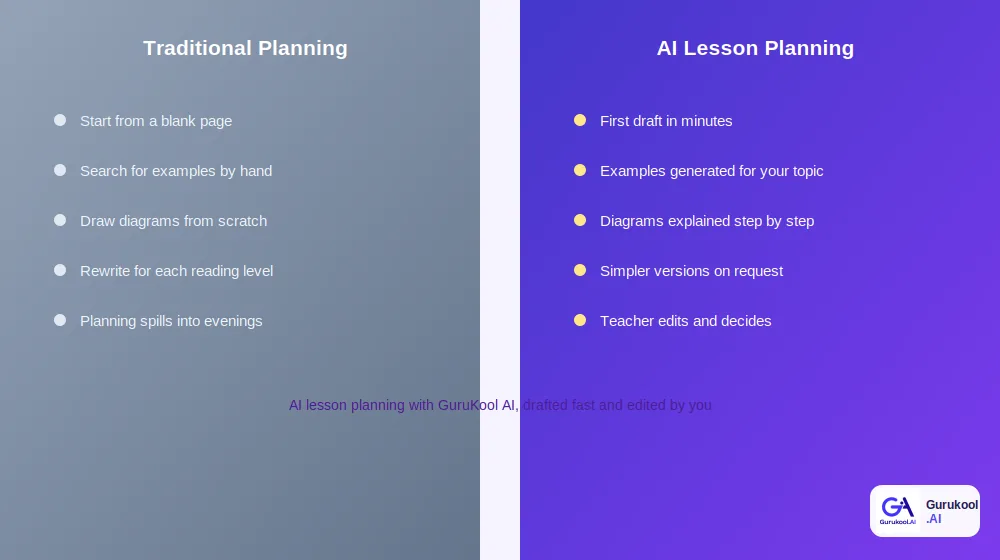
Traditional planning versus AI-assisted planning, step by step
| Factor | Traditional Planning | AI Lesson Planning (GuruKool AI) |
|---|---|---|
| Starting point | A blank page | A first draft in minutes |
| Examples | Searched for by hand | Generated for your topic and level |
| Diagrams | Drawn from scratch | Built and explained on a whiteboard |
| Differentiation | Rewritten for each level | Simpler versions on request |
| Teacher control | Complete, but time-heavy | Complete, with a faster draft |
Time From Blank Page to First Draft
The biggest difference in lesson planning is how quickly a usable draft appears. Instead of spending the first thirty minutes deciding where to begin, a teacher starts by editing. That shift matters because editing a draft is far less tiring than inventing one, and it leaves more energy for the decisions that actually need a teacher’s judgment.
Differentiation and Adaptation
Traditional lesson planning treats each version of a handout as a separate job. AI lesson planning treats it as a request: make this simpler, make this harder, add a visual, add an example. That turns differentiation from the slowest part of the process into one of the fastest, which is especially valuable in mixed-ability classrooms.
It is worth being clear about what does not change. A teacher still chooses the learning goals, the order of activities, and the level of challenge, and still decides what is finally shared with students. The comparison above is about where the hours go, not about who is in charge. Teachers who treat the tool as a quick assistant, rather than an authority, tend to be the ones who report that their preparation feels lighter and their lessons feel more like their own.
How GuruKool AI Supports Lesson Planning
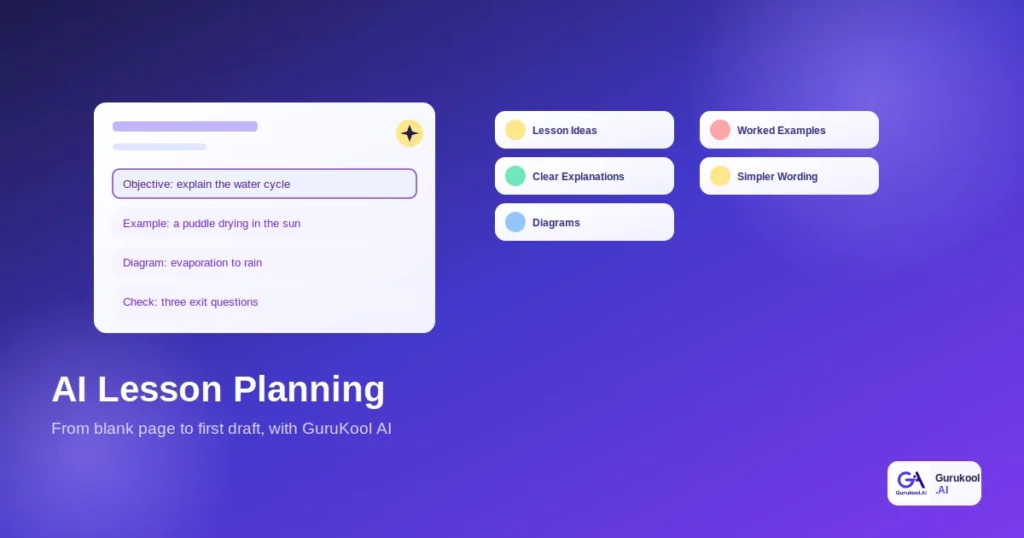
GuruKool AI brings the five lesson planning jobs together in one platform, so a teacher does not have to move between a chatbot, a drawing tool, and a document editor to finish one lesson.
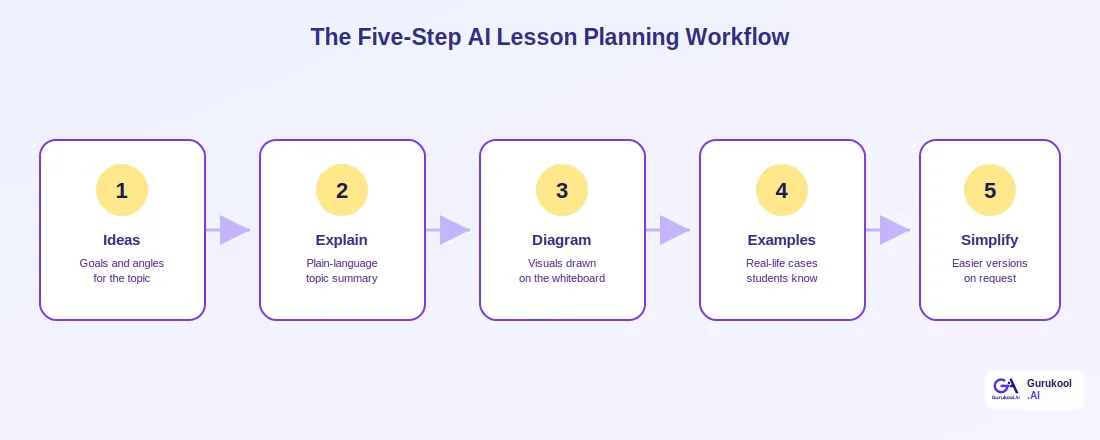
The five-step workflow behind GuruKool AI lesson planning
From Topic to Draft in One Place
A teacher enters a topic and gets lesson ideas, a plain-language explanation, and suggested examples together. Uploading a reading to the AI PDF reader adds a summary and discussion questions, and PDF annotation lets the teacher mark up a handout once and share it with the whole class. The smart library can then surface related material.
Visuals and Examples Built In
Diagrams and examples are not separate chores in GuruKool AI. The whiteboard explains each drawing as it is built, and examples can be adjusted to the class by age, subject, and reading level. Because the platform also tracks how students respond through adaptive learning, next week’s lesson planning starts from what students actually understood rather than a guess.
Control stays with the teacher throughout. Nothing generated in GuruKool AI is final until you edit it, and you can ask for a different angle, a shorter version, or a harder challenge as many times as you like. Because the same account also supports students through the AI tutor and analytics, the explanation you prepare on Sunday is the same one a student can revisit on Wednesday night, which keeps the classroom and the homework working from one consistent source.
Plan your next lesson in one place. Start a free GuruKool AI demo today.
A Lesson Planning Session in Action
It helps to see the workflow on a real topic. Here is how a middle school science teacher might plan a lesson on the water cycle on a Sunday afternoon.
Building the First Draft
She types the topic and grade level and asks for three ways to open the lesson. One idea, a puddle drying on a warm day, fits her students perfectly, so she keeps it. She asks for a plain-language explanation to check her own wording, then asks for two examples from daily life. In about ten minutes she has the skeleton of a lesson that used to take her an hour.
Adding Visuals and Easier Versions
Next, she sketches the water cycle on the interactive whiteboard and saves it for Monday. Three students in her class read below grade level, so she asks for a simpler version of the explanation and a shorter example. She edits the wording to sound like herself, adds a three-question check at the end, and finishes before dinner.
That session follows a pattern most teachers can repeat:
- Enter the topic and grade level, then review the lesson ideas.
- Ask for a plain-language explanation and check it for accuracy.
- Build the diagram on the whiteboard and save it.
- Request examples that fit your students’ age and interests.
- Generate simpler versions for students who need them, then edit everything in your own voice.
Before wrapping up, here are answers to a few of the most common questions teachers ask about AI lesson planning.
Frequently Asked Questions About AI Lesson Planning
What is AI lesson planning?
AI lesson planning is the use of an AI system to draft parts of a lesson, such as ideas, explanations, examples, diagrams, and simpler versions. The teacher reviews and edits everything, so the AI speeds up preparation without replacing professional judgment about the students in the room.
How much time does AI lesson planning actually save?
It depends on how you use it. A recent Education Endowment Foundation trial found about 49 minutes saved per week, while Gallup found weekly AI users estimate saving 5.9 hours across all tasks. Controlled results are smaller, but the savings are real and grow with practice.
Will AI lesson plans make my teaching feel generic?
Only if you use the first draft unchanged. AI drafts are technically sound but blind to your students, your school, and your pacing. Treat every plan as a starting point, add your own examples and voice, and your lessons will sound like you instead of a template.
Can AI lesson planning help with mixed-ability classes?
Yes. Differentiation is one of the biggest time savers, because AI can produce simpler or more challenging versions of the same explanation in seconds. That lets one lesson serve several levels, without you rewriting every handout by hand or singling out any student.
How does GuruKool AI support lesson planning?
GuruKool AI generates lesson ideas, explains topics, builds diagrams on an interactive whiteboard, prepares examples, and simplifies difficult concepts, all in one platform. It also connects to PDF reading, annotation, and analytics, so planning starts from what your students actually understood last week.
Conclusion
AI lesson planning will not plan your lessons for you, and it should not. What it can do is remove the blank page, produce examples and diagrams in minutes, and make differentiation far less painful, so your attention goes to the decisions that truly need a teacher. The evidence is honest about the size of the gain: a few dozen minutes a week in controlled trials, and several hours a week in teacher surveys, with the biggest benefits for those newest to a subject. If you are new to this, start small: pick one upcoming unit, let the tool draft the opening and the examples, and compare the result with your usual preparation. One trial week will tell you more than any survey about whether the time saved is worth it for you and your students.
GuruKool AI brings lesson ideas, explanations, diagrams, examples, and simplified versions into a single platform, so AI lesson planning becomes a calm, repeatable part of your week instead of another tool to manage.
Try planning your next lesson with a first draft in hand. Start a free GuruKool AI demo today.
Sources: Education Business UK, AI tool cuts teachers’ lesson planning time by almost a quarter; Gallup, Three in 10 Teachers Use AI Weekly, Saving Six Weeks a Year.
Related reading: the best AI tools for teachers, the best AI tools for students, and where AI in education is headed next.